QR-Codes win mostly

QR-Codes win, mostly.
トリエステディレクトリ

www.BikeComputer.Tel
qrcode

www.Triest.Tel


Wednesday, 22 December 2010

Video about QR-Codes

Scan my .tel!


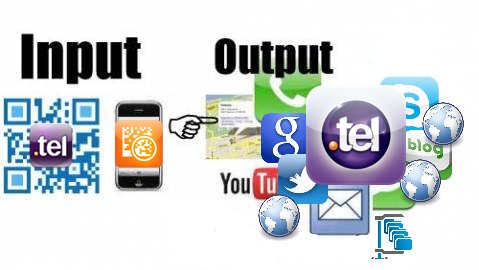
(QR-Code) --> (Scanner = Smart Phone) --> (Mobile Website Content)

Tuesday, 21 December 2010

Sunday, 19 December 2010

Scan Me! I am the mobile friendly landing page about Tesla Motors: www.teslamotors.tel.


.

This is the future: QR-Code Reader. Here is a QR-Code reader we recommend


Some phones have readers' standard now and it's easy to download. Japan has been using it for years. I heard kids have t-shirts printed with a Neoreader that links it to their ‘Myspace.'

In the future, newspaper ads would have Neoreaders so readers would zap the paper to learn everything about the listing. Perhaps newspaper ads would become extremely valuable once again.

This is the future.

Access mobile web pages

A 2D code can link directly to a mobile web page. When scanned, the information is delivered to your handset without having to type the URL into your phone's browser.


http://in-telinside.blogspot.com/


We recommend the NeoReader QR Code Reader:

How NeoReader Works


The NeoReader is a universal barcode scanning application that transforms your mobile phone into a barcode scanner and allows you to access mobile web content by scanning codes from print ads, publication, packaging, billboards, retail display, broadcast media, or any other medium.

Universal means that the NeoReader scans all the standard code types (Data Matrix, QR codes, Aztec Codes, EAN, UPC, and Code 128), so NeoReader is the only scanning software you’ll need.

Install the NeoReader barcode scanning software and you're one easy click away from information you want - everywhere you go.

It's so easy to use - launch the NeoReader, click on the barcode with your camera and ZIP...the content is delivered to your phone. No typing URLs into your browser, no painful search engines, no cumbersome menu's to navigate.

If you can think it, we can link it!

The possibilities are endless.


Get NeoReader:
Please visit get.neoreader.com from your mobile device:
Link:

http://www.neoreader.com/get-neoreader/wap-download

.

Saturday, 18 December 2010

How to make a unique QR-ironed T-shirt?


How to make a unique QR-ironed T-shirt?


You will need to have QR T-shirt package from Kitchen Budapest for making a KIBU styled QR T-shirt. If you don't have one, and are interested in or you would like to have a QR Code T-Shirt please send us an email for this address: qrt-shirt@kitchenbudapest.hu.

Besides our QR T-shirt package, you will need an iron, an iron-table, and a tracing paper to continue.

You can generate your QR code for example using the free service on qrcode.kaywa.com. Please check what is the size of your sample QR code sticker - is should be 21x21 or 25x25 matrix. This is important to know, because you have to use a specific lengt of text to target a specific size of QR code while encoding.

(To read the QR code you will need to install decoder application to your computer or mobile device. You can find help on our T-shirt message project page under "Resources".)

For example, to generate a 25x25 pixel QR code you have to use a text containing more than 11 but less than 20 letters.

Here is a help:

21x21 QR code: 0-11 letters
25x25 QR code: 11-20 letters

a.) If you managed to generate your QR code, the next step is that you will have to reproduce it manually to have an ironable sticker.

Now you have to use the QR code sample sticker found in your package, and remove the exra pixels from it. Be careful, for you will remove pixels form the back side of the sticker, you have to think mirrored. You also have to take care to remove pixels from the white areas of the QR code.

QR code experiments

One strategy to avoid mistakes to print the QR code mirrored and remove the pixels while keeping one eye on the print.

Even better strategy is to print the QR code in the same size as the sticker, then temporary fasten the print to the sticker by tapes, and then use a pin to punch the white areas systematically to make visible holes on the sticker sheet. After doing this you can easily remove the punched parts from the sheet.

Don't trouble if you made a couple of mistakes - the QR decoders can handle some errors in the code.

b.) If you have your QR sticker you have to transfer on the T-shirt by ironing it. You will have to follow these instructions for best result:


1. Put the sticker sheet onto the T-shirt with the plastic glossy side up.

2. Put a sheet of tracing paper or fabric on the top of the transfer sheet to avoid the iron being contacted directly with the plastic side of the transfer sheet.

3. Iron it for 15-20 second by 160°C degrees with an average pressure on the sheet.

4. Wait for a couple of minutes for the sheet to get cold.

5. Remove the plastic film of the transfer sheet.
Your T-shirt you made in this way is durable and washable
at a maximum of 60°C degrees.


6. You are ready... smile and wear it!

Last step: customise your geek avatar!

Using the spare black pixels you removed from the transfer sheet you can customise the "geek" avatar printed on the T-shirt. For a basic idea you can make a feminin or masculin character as you can see on the picture below.


Or you can use your creativity at this part - just place the black pixel remains anywhere you want - to make hair, mouth, nose or shoes for the avatar - put a piece of tracing paper onto it and iron it!


Source:
http://www.kitchenbudapest.hu/en/howto_make_qrcode_tshirt

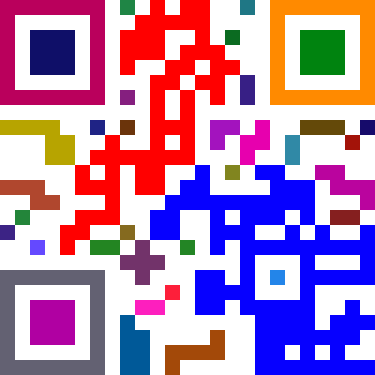
A Little Bit Of QR Code Colour Loving For Dot Tel Domains


Others have noted that if you have enough contrast between foreground and background, most readers will still recognise the code – but lets make every block a different colour! Yup, it still works! Its a lot more prettier and fancier, but a thing to note is that you should still use colours that are a high contrast to the background. I guess I could have used a pale yellow instead of a white background to add more…but that’ll be just over doing it.

Source: http://www.madox.net/blog/2009/06/18/a-little-bit-of-qr-code-colour-loving/

Ok:
So let me make a test with my own code, for www.Triest.Tel:

qrcode


GIMP Image Editor

1.)
Werkzeuge
Auswahlwerkzeuge
Rechteckige Auswahl

2.)
Bild
Modus
RGB

3.)
Rechter Mouse Klick
Auswahl
Nach Farbe
Bearbeiten
Mit VG Farbe Füllen
VG/HG Farbe


First Results:


4.)
Auswahl
Auswahleditor
Auswahl
Invertieren
Mit VG Farbe Füllen
Werkzeuge
Auswahlwerkzeuge
Rechteckige Auswahl


5.)
Kanäle
Rot
(RGB, 2 Ebenen)


6.)
Malwerkzeuge
Füllen